How Encryption Works - Basics
A conversation on encryption as a whole can be very broad and confusing to someone who knows little about it. Encryption exists in every aspect of our daily lives, whether you know it or not.
My favorite example of something that uses encryption in our day-to-day lives is Apple's Face ID. I consistently praise Apple for its privacy and security features while keeping users' private data safe from malicious intent. Contrary to what most believe, Face ID is not a stored photo of your face being compared to what your camera currently sees in order to unlock your phone. Having a printout of your face against the Face ID sensor will not unlock your phone.
So, how does Face ID work? To put it simply, Face ID uses Apple's TrueDepth camera, which essentially projects tens of thousands of tiny infrared dots to create a 3D depth map of your face. That data is then transformed into a mathematical representation of your face, which is encrypted and locally stored within the Secure Enclave on your phone. With each authentication, Face ID not only refines its data based on appearance changes but also doubles down on its generated data to prevent spoofing attacks. Apple's security model illustrates how advanced encryption can become. Unfortunately, as much as I would love to write an entire essay on Apple's security features and innovations, this would stray too far from our current topic of the basics of encryption. I will save the Apple discussion for a future post.
Encryption History
Encryption is not modern; it's not a new advancement in communication and technology. Cryptography has existed for thousands of years. Its ancient origins gave people the ability to communicate in what appeared to be gibberish. However, this wasn't gibberish to those who knew how to decipher it — it was a form of language that required the sender and receiver to have prior knowledge of a "key" in order to convert "gibberish" into legible information.
Cryptography's Origins - Ancient Egyptians and Assyrians
The earliest forms of cryptography can be attributed to around 1900 BC in Ancient Egypt, where scribes obscured the meaning of inscriptions using a non-standard form of hieroglyphs primarily as a form of religious secrecy; they believed those secret words had the ability to possess protective or spiritual power. The need for privacy essentially created our earliest forms of encryption — it's interesting how that held for thousands of years.
A few centuries later, around 1500 BC, we can attribute a primitive form of "digital signatures" and authentication to Assyrian merchants who wanted to uniquely verify their trade goods. Small engraved stones known as cylinder seals were used to create impressions on wet clay tablets to identify the individual or business involved in a transaction. Each seal had a unique design; no two seals were identical.
GIAC has a great document highlighting these two forms of encryption in a "History of Encryption" paper.
Classical Ciphers - From Spartans to Julius Caesar
The Spartans are credited with being some of the early founders of the concept of using shared keys. To keep messages secure, the Spartans would write their messages onto a strip of leather wrapped around a rod. These messages could only be decrypted using an identical rod that allowed the message to be read correctly. This cipher was called the Scytale cipher. This concept is one of the fundamentals of symmetric cryptography: the idea of using shared keys.
The Caesar cipher is one of the most notable ciphers that many of us learn in high school computer classes or beginner cybersecurity courses. It's a simple substitution cipher that works by taking a letter and replacing it with another letter located a fixed number of positions down the alphabet. Although this idea is considered very primitive for modern systems, it was a key part of cryptography history and remains important to know about.
The Enigma Machine
While the history of cryptography is vast, I will have to save the details for another post. However, I will write about one of my favorite pieces of cryptography history: decrypting Enigma during WW2. The Enigma machine was an early form of mechanical encryption adopted by the German military in the mid-1920s. This device functioned by using a series of rotating electromechanical rotors that scrambled plaintext into ciphertext. The security of this machine came from the ability to "rotate its keys," which involved a predefined key list for essentially setting the machine's configuration, like rotor ordering and ring settings. The German military would have a new configuration available each day, making efforts at decryption much more difficult, as messages for a specific day would require their own decryption configuration.
Enigma was reverse-engineered before WW2 even began. In 1932, Marian Rejewski, Jerzy Różycki, and Henryk Zygalski reverse-engineered the Enigma machine and built replicas of the Enigma machine based on their findings. However, this didn't mean that the ability to decrypt messages created by Enigma was immediate; reverse-engineering simply meant the machine itself was replicated and its functionality was known. Decryption came years later, during the early years of World War 2.
Alan Turing and Gordon Welchman developed the Bombe, building on the Polish cryptologists' earlier work; essentially a machine that was able to brute-force encrypted Enigma messages until the correct configuration was found. The Bombe was capable of testing thousands of key configurations per minute to find that day's Enigma configuration. There is an excellent movie about this piece of history called "The Imitation Game". It's a great watch for those who want to learn more about cryptography and the history of encryption.
Core Concepts of Encryption
Encryption works by converting readable data into an unreadable form, essentially turning plaintext into ciphertext. Encryption is used to ensure that only authorized parties can recover the original message through decryption.
Fundamentals of Encryption
There are a few simple terms to go over regarding the fundamentals of encryption:
- Plaintext: Your original, readable data.
- Ciphertext: The encrypted version of your plaintext data that is no longer readable. This can appear as random characters, binary data, etc.
- Encryption: The process of converting plaintext into ciphertext using a specific algorithm and key.
- Symmetric Key Encryption: The same key used to encrypt a message is also used to decrypt the message (e.g., AES/DES). DES is now considered insecure and obsolete.
- Asymmetric Key Encryption: Two (related) keys are used: a public key and a private key. A public key can be used to encrypt a message that the private key can decrypt.
- Decryption: The inverse process of encryption, transforming ciphertext back into plaintext using a corresponding key.
Encryption and Decryption as Inverse Processes
Encryption and decryption can both be represented as a mathematical formula:
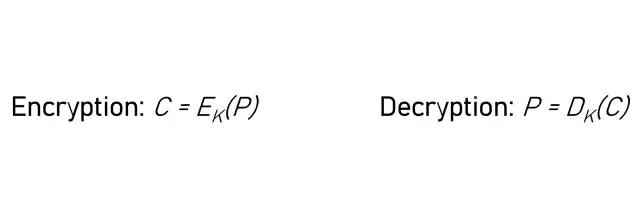
Where:
- P = Plaintext
- C = Ciphertext
- E = Encryption Function
- D = Decryption Function
- K = Cryptographic Key
Additionally:
- Symmetric systems: E and D use the same K.
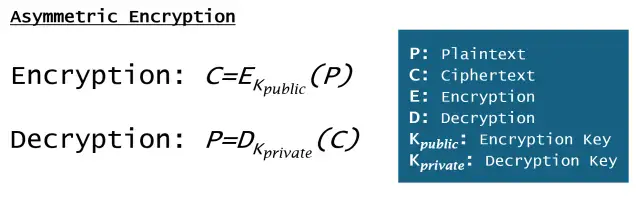
- Asymmetric systems use related keys (K public, K private).
Entropy and Randomness
Entropy refers to a measure of unpredictability or randomness in a system. High entropy in regard to keys indicates that the keys and outputs have a high degree of randomness, which makes them resistant to pattern analysis or brute-force attacks. Encryption relies on high-entropy keys to ensure security; if a key is predictable, encryption can be broken.
Sourcing entropy is a whole other conversation, but to keep things brief: random noise, hardware events, or cryptographic randomness are commonly used as sources. There are many more creative and unique approaches to sourcing "randomness" — however, that's a future discussion. Entropy is one of my favorite topics when it comes to reverse engineering malware. I will be writing a post regarding entropy in malware sometime soon, along with a post about sourcing randomness.
Symmetric Encryption
As discussed in the Fundamentals of Encryption section, symmetric encryption works by using the same key to both encrypt and decrypt data. You might assume this is an incredibly weak form of encryption because only one key is needed to encrypt and decrypt a message. However, you'd be surprised at how useful symmetric encryption can be and how it's used everywhere around you. It's not that it's insecure by definition — it's very secure if used correctly.
How Symmetric Encryption Works
The sender uses a key to encrypt plaintext into ciphertext; that same key can be used to reverse the process and decrypt ciphertext back into the original plaintext. There is only one secret shared between both parties: the key. As long as the key remains secret, an outside party cannot read the plaintext from the encrypted ciphertext.
Symbolic form of symmetric encryption:
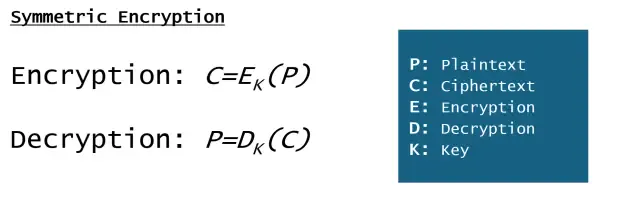
In symmetric encryption, E (Encryption) and D (Decryption) use the same K (key) value.
Symmetric Encryption Advantages
Why do we use symmetric encryption? What makes it an attractive encryption model?
- Speed: Symmetric encryption is much faster than asymmetric encryption, as the mathematical operations are less computationally demanding due to its simplicity.
- Simplicity: Since only one key is needed, implementation is straightforward.
- Efficiency: Symmetric encryption is ideal for encrypting large datasets, files, and real-time streams of information. If performance is essential, symmetric encryption is the way to go.
Symmetric Encryption Disadvantages
Key distribution is one of the biggest weaknesses of the symmetric model. Both parties need to know the key for the exchange to work properly. The key exchange is the most notable weak point for this form of encryption; if the key is intercepted during transfer, you can consider the encrypted message(s) compromised.
The Symmetric Solution
In an interesting twist, most modern uses of symmetric encryption begin with an asymmetric key exchange: asymmetric cryptography is used to establish the symmetric session key. This is essentially how HTTPS works today.
Elaborating on asymmetric/symmetric use in HTTPS: HTTPS uses the TLS protocol, which combines asymmetric cryptography for authentication and key exchange with symmetric cryptography for fast bulk encryption. If you dive deeper into TLS you'll learn about the handshake (ClientHello, ServerHello), certificates and Certificate Authorities, key‑exchange methods (for example, ECDHE), cipher suites, and features such as forward secrecy and session resumption.
Symmetric Cryptography: Modern Examples
Symmetric cryptography is used everywhere today, even in some places you might not expect.
Disk & File Encryption
AES is used to encrypt entire hard drives using tools such as Windows BitLocker or macOS FileVault. Both rely on AES to encrypt and secure data even if the physical drive is stolen. Other tools such as 7‑Zip use AES to protect data at the file level.
Database Data Protection
Some databases, like Oracle TDE, use symmetric encryption for transparent data encryption (TDE), which maintains protections without a large performance hit.
Secure Messaging Platforms
One notable use of symmetric encryption is in services such as Signal and WhatsApp. These systems use asymmetric cryptography for authenticated key exchange and then symmetric cryptography for actual message encryption, which demonstrates how crucial symmetric cryptography is for these services.
Asymmetric Encryption
Unlike symmetric encryption, asymmetric encryption requires two keys instead of just one. A pair of mathematically related keys, known as a public key and a private key, are required for asymmetric encryption to work. With asymmetric cryptography, one key encrypts while the other decrypts. This enables two parties to securely communicate without ever sharing a secret symmetric key.
How Asymmetric Encryption Works
The process can be summarized in the following steps:
- Key generation: Each party generates a related key pair (private and public keys).
- Encryption: To encrypt plaintext intended for someone, you use the recipient's public key.
- Decryption: Once the ciphertext is received, the recipient uses their private key to decrypt.
An easy way to remember the differences between public and private keys:
- Public key: This key can be shared openly; anyone can use it to encrypt messages they plan to send to you.
- Private key: This key must be kept private; it is used to decrypt messages that were encrypted with your public key.
Symbolic form of asymmetric encryption:
Asymmetric Encryption Advantages
Because no pre‑shared secret is required, asymmetric cryptography solves the key distribution problem inherent to symmetric encryption: as long as your private key remains secret, data encrypted with your public key can only be decrypted by you.
Digital signatures are another advantage: a private key can sign data and the public key can validate that signature. Much of modern internet security relies on asymmetric cryptography.
Asymmetric Encryption Disadvantages
Asymmetric algorithms are computationally more expensive than symmetric ones. This performance difference is noticable for high‑volume bulk encryption scenarios (large files, streams, or many simultaneous encrypt/decrypt operations), which is why systems use hybrid approaches.
This leads to a hybrid approach where asymmetric and symmetric cryptography work together: asymmetric methods for authentication and key exchange, symmetric methods for efficient bulk encryption.
Hashing vs. Encryption
Hashing and encryption both turn readable data into a different form, but they serve different purposes. Hashing provides integrity; encryption provides confidentiality.
| Concept | Encryption | Hashing |
|---|---|---|
| Purpose | Data confidentiality (keeps data secret) | Data integrity (ensures data has not been tampered with) |
| Reversibility | Reversible with key | Irreversible / one‑way: hashed data cannot be reversed |
| Key Usage | Requires key(s) for encryption/decryption | No key usage |
| Output | Variable length, data and algorithm dependent | Fixed length: output size is constant for a given hash function |
| Use Case | Protecting data in transit or at rest | Verifying authenticity and integrity |
Hashing Explained
Hashing is the process of converting an input (text, files, password) into a fixed-length string. This fixed-length string of characters are known as the hash value or digest. Hashing makes the process one-way, as in the hash value cannot be used to recover the original input. The hash output will always be a fixed-length, adding more data or less data will always return a fixed-length value. For example, let's take the MD5 alogorithm as an example. This algorithm has an output size of 128 bits which can be represened as 32 hex characters. The hash value of a simple text file will have the same length as a giant 4k movie, 32 hex characters long.
MD5 Hashes
Let's take "Hello World" and convert it to an MD5 hash, this gives us the value b10a8db164e0754105b7a99be72e3fe5. The string "Hello World" is just 11 characters long, but the MD5 hash ends up being 32 characters long. The MD5 hash value for the latest WinRAR executable installer, a 3.4MB file, is e9c25667deda9588c49773cf5f6ef388.
I was trying to install WinRAR on my virtual machine and had its VirusTotal page open while writing this.
Still confused? That's completely understandable! If you're new to the concept of hashing, you'd ask why "Hello World" gives us b10a8db164e0754105b7a99be72e3fe5 while a 3.4MB executable gives us e9c25667deda9588c49773cf5f6ef388. How can a 11 character string turn into a 32 character string while a 3.4MB installer can be represented within a 32 character string?
Modifying The String
To answer this question, let's first start off by slightly changing our "Hello World" string by adding an exclamation point at the end. The new MD5 hash for "Hello World!" is ed076287532e86365e841e92bfc50d8c. Adding a single exclamation mark changed the original b10a8db164e0754105b7a99be72e3fe5 into ed076287532e86365e841e92bfc50d8c. This example may still make you a little confused, what's the purpose of hashing if the output will always be a 32-character long bundle of numbers and letters, regardless of how big or small the input size may be?
Integrity: The WinRAR Example
This is where integrity comes in to play. Imagine you're trying to download that very same WinRAR executable installer file that I was just talking about. Let's say that, on the WinRAR download page, WinRAR gives us the MD5 hash value of e9c25667deda9588c49773cf5f6ef388 for that installer file, let's call that "WinRAR-713.exe". A file hash value is typically provided alongside downloads to show users that the file they downloaded should match the posted MD5 hash to ensure that they downloaded the exact same file WinRAR has made available.
Now, in a new scenario, instead of downloading it from WinRAR you decide to download it from an email your boss sent you with "WinRAR-713.exe" as a file attachment, the same exact filename with the correct version number for the latest release. You run that executable file and, just like that, your computer is infected with Ransomware. The installer looked just like the standard WinRAR installer, why did your computer become a victim to a ransomware campaign, what gives?
You upload the "WinRAR-713.exe" file to VirusTotal to get more details, 70 out of 70 detections, it's a WannaCry variant. You go into the details tab and notice the hash value is different, it's not the same e9c25667deda9588c49773cf5f6ef388 posted on WinRAR's website, it's 9fdb84667721a953898a080e5e944292. A few minutes later, your boss calls you to tell you that his email was hacked and to not download any files that come from his email address. Well now your office has bigger things to worry about than a simple email address hack, everything including your backups are encrypted behind a ransomware paywall.
The hash value changed because a malicious actor either modified the WinRAR executable ever so slighly to include a call to install and run a malicious payload or the bad actor simply renamed their ransomware as "WinRAR-713.exe". Remember the "Hello World" vs. "Hello World!" example, a single exclamation mark made the biggest difference. Changing the installer in the slightest way will render a completely different MD5 hash value.
Integrity: What You Should Have Done
What could have been done differently? In this scenario, WinRAR did offer the official MD5 hash for their latest installer file, e9c25667deda9588c49773cf5f6ef388. If you still ended up downloading the "WinRAR-713.exe" file from that email attachment, you could easily compute the MD5 value from it and compare it against to the official MD5 hash value provided by WinRAR. You compute the MD5 hash value from "WinRAR-713.exe" and see 9fdb84667721a953898a080e5e944292 as the returned value, clearly different from the official e9c25667deda9588c49773cf5f6ef388. This indicates to us that we potentially downloaded a modified WinRAR installer as the two hash values do not match. This is one of the purposes to hashing, to ensure and verify integrity.
Password Hashing
We now should understand what hashing is and how it works, but why use it with passwords then? If passwords were just MD5 hash values, couldn't I just guess the 32 character hex value to login to someone's account? Although MD5 isn't typically used for password hashing anymore, you simply can't just enter in the MD5 hash and login to an account. When you login, you enter your password in as plaintext, it's then converted into a hash value, that hash value is then compared to the hash value stored on the service's database. If it matches, you entered in the correct plaintext password and are granted authentication to the site. So, it's not as simple as entering in a hash, you still need the password.
Password Cracking
However, not all hope is lost, there are still ways to map a password to its MD5 hash value! This is done with password cracking, typically, a method that involves using either a pre-defined dictionary or "password generator" that acts as the input value for tools such as Hashcat. Hashcat uses your hardware to compute plaintext into a hash value. You can either have it run until a specific hash match is made or you can generate a list of passwords and their hashes.
MD5 hashes have an output length of 32 hex characters, meaning that there are 2128 possible hashes. That's 340,282,366,920,938,463,463,374,607,431,768,211,456 possible hashes! Just for fun, I converted that figure into words:
three hundred forty undecillion two hundred eighty-two decillion three hundred sixty-six nonillion nine hundred twenty octillion nine hundred thirty-eight septillion four hundred sixty-three sextillion four hundred sixty-three quintillion three hundred seventy-four quadrillion six hundred seven trillion four hundred thirty-one billion seven hundred sixty-eight million two hundred eleven thousand four hundred fifty-sixClearly a lot of possible hashes, you'd need to generate a unique input value per calculation just to receive a unique hash value, map that value out, and then eventually, you may be able to figure out some user's password based off a hash value. With tools like Hashcat, it's far easier and faster to guess short passwords, especially if they do not contain any characters, numbers, and case-sensitivty. The password admin would be a super simple crack, it has no symbols, no numbers, no uppercase letters, and it's just 5 characters in length.
Five lowercase alphabetical values is all we need to guess here. The English language has 26 letters, with 5 characters, that gives us only 265 possible combinations, 11,881,376 combinations to be specific. A low-end CPU (~1 million hashes per second) can exhaust all possible combinations in just under 15 seconds.
Super fast, right? What about capital letters? We will keep the limit of 5 characters but also allow for the user to use capital letters, AdmiN.
Introducing capital letters increases the difficulty to 525 (380,204,032) possible combinations. Using that same low-end CPU, we're looking at over 6 minutes to exhaust all possible combinations. From 15 seconds to over 6 minutes is a large jump, however, still not a long wait. Let's now introduce numbers (0-9), Adm1N will be our password. This increases the difficulty to 625 (916,132,832) possible combinations, which will take a little over 15 minutes to compute, again, not the craziest wait time.
Okay, we're now going to allow symbols for our password, @dm1N. Symbols are a little tricky as some symbols are allowed and some are prohibited depending on where you're logging into, however, let's assume these symbols are allowed (properly sanitized):
! @ # $ % ^ & * ( ) - _ + = [ ] { } ; : ' " , . < > / ? \
**White-space included**
That's about 30 new characters that we can include into our password, bringing our difficulty to 925 (6,590,815,232) possible combinations. The same low-end CPU will take about 110 minutes to exhaust all possible combinations. Again, not terrible, you can run through all possible 5 characters passwords that are case-sensitive, alphanumeric, and can include symbols in just under 2 hours.
However, that's nothing, most sites don't allow for passwords under 8 characters in length. 8 characters minimum would bring our difficult up to 928 (5,132,188,731,375,616) possible combinations in total which should take ~59,400 days or ~162 years to exhaust using that same low-end CPU. That's going to take you more than a lifetime to crack an 8 character long password, this is why you should always use longer passwords everywhere you go.
But that's all with a low-end CPU, want to know how long it will take to exhaust all possible general inputs to MD5 hashes? With a GPU farm running at about 100 billion hashes per second, you can still expect a potential wait time of over 100,000,000,000,000,000,000 years to fully exhaust all possible MD5 hash outputs.
As you can tell, password hashes alone are very complex and secure to an extent, just as long as you can remember a password with a little more than 5 characters in length.
Hashing Conclusion
There are many more things to talk about regarding hashing that revolve around things bigger than just passwords, however, that will also be a different post on my site when I get around to writing about it. For now, this should give you a good idea regarding how hashing plays a vital role in data integrity and how it differs greatly from encryption.
Conclusion: Encryption Basics
Encryption is a very large topic and if I wanted to, I could write pages upon pages of information regarding encryption alone, however, this post should give you a good understanding on encryption basics and its real world uses.